 Zêr û ziber
Support
Everything you need to know to use Zêr û ziber, and how to reach us if something goes wrong.
The app is available in seven languages.
How it works
- Create a list. One list per family or per wedding. A sample list, with fictional names, is provided to try the app without entering anything.
- Add the events. Each wedding (or circumcision, birth…) is a dated event; the members of your family who return are the “branches” of the list.
- Record what you receive. From the profile of an event or a person: money, gold (coins, bracelets, grams, carats) or gifts, with, if you wish, an agreed target to return.
- Record what you return. The “Add” tab is for returns: who returned, to whom, what, and on what occasion. The date can remain unknown and be filled in later.
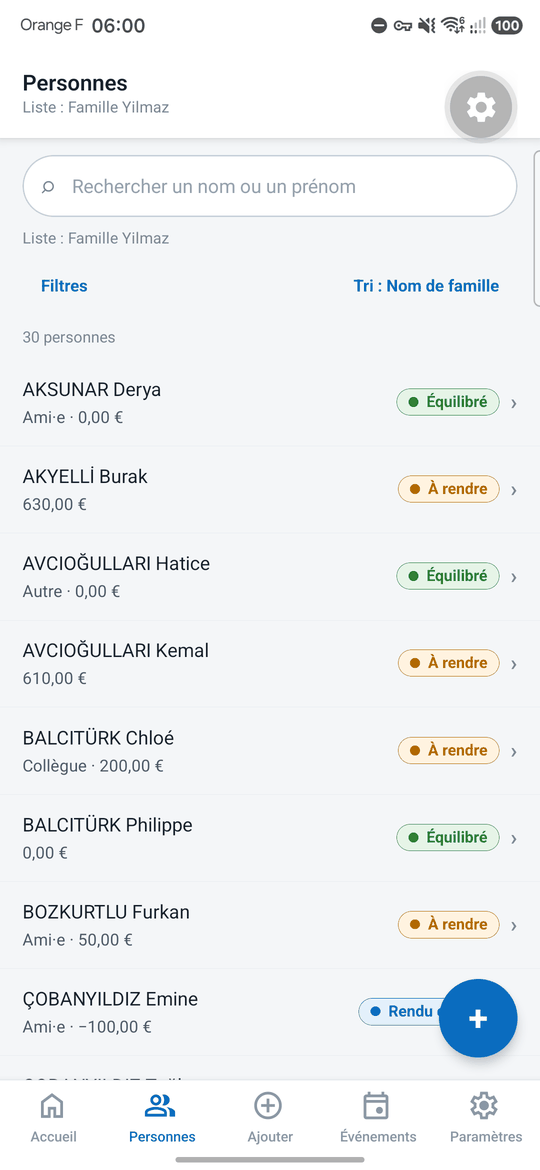
- View and export. The dashboard, the list of people and each profile show the balances; the Excel or PDF export gives you a copy at any time.
Frequently asked questions
These answers mirror the Settings › Help screen of the app.
How is the balance calculated?
For each person and each type (money, gold, gifts), balance = received − returned. Types never mix: gold and gifts are not converted into euros.
What do “To return”, “Settled” and “Over-returned” mean?
“To return”: something is still left to return. “Settled”: what was received has been returned. “Over-returned”: more was returned than received (an “advance” if nothing had been received).
The dashboard never adds a “to return” to an “over-returned”: the two are shown separately.
What is the agreed target?
Each contribution received can carry an agreed amount to return (0 = nothing to return). Otherwise the list rule applies: equivalent (100%), percentage, cap or none.
The status is computed on the agreed remaining; the raw balance is still shown next to it.
How are gold and gifts counted?
Gold is counted by unit (coin, bracelet, gram or free label) with coin fractions (¼, ½). The carats (24, 22, 21, 18, 14) are optional descriptive information: they change neither the quantity nor the balances.
Gifts are counted in items. A dated estimate in euros can be entered: it is shown separately and marked “partial” if not every entry has a value.
I received gold and returned euros: what should I do?
If gold was received and euros were returned, both lines remain separate. You can declare that this return settles the gold contribution: its target becomes 0 without changing the amounts.
What is a “closed” relationship?
A person who has moved away, passed away or with whom ties are broken can be marked “closed”: they leave “left to return” and appear separately, without any amount changing.
How do I correct a mistake or undo something?
To correct something, edit the entry (do not add a correcting entry). Every action is logged in the History and can be undone. Nothing is permanently deleted: the Trash lets you restore.
How do I import an Excel workbook?
From Settings › Import / Export, choose an Excel workbook (.xlsx, .xlsm, .xls): the file is read on your device and a preview is shown to you before anything is saved.
What is read: the last and first name (or full name), the event columns whose header carries a date (contributions received), the family member columns (returns given) and the comments.
What is skipped: computed columns (Total received, Given, Balance — they are only used to check the totals), the TOTAL row, rows without a name and doubtful values (“100 ?”), all flagged in the preview.
Duplicates are flagged, never merged; if you later merge two profiles, a re-import recognizes the kept profile. Re-importing the same file into the same list creates nothing; an amount corrected in the file is only updated if you tick the option.
Limitation: two rows with exactly the same last and first name (namesakes) are recognized by their order in the file; if you insert, delete or move a namesake row, the preview flags it and the matching of those profiles must be checked. The sample list (fictional data) cannot receive an import.
Each import forms a batch in the History: “Undo (batch)” removes it entirely, unless an item added since still uses an imported profile, member or event.
How do I export my data?
From Settings › Import / Export: the Excel export produces a workbook with the People, Entries, Events and Branches sheets; the PDF export produces a report with the totals and the people with their balances (the entry details are optional).
The app creates the file, then you choose who to share it with using your phone's share sheet. Nothing is sent without your action.
Where is my data? What happens if I uninstall the app?
All your data is stored only on your phone, in the app's local database; it is not sent to any server, even if you create the optional account (which contains only your email and your display name). No ads, no tracking. If you uninstall the app, its data is deleted with it: export first.
Details in the privacy policy. To delete your account: account deletion.
How do I change the language or request a new one?
In Settings › Language. The app follows the phone's language by default (French, English, Turkish, Kurmanji, German, Spanish, Italian). “Other language…” prepares a request by email in your email app; nothing is sent without your confirmation.
What is the “Have my list typed up” service?
If your lists are in notebooks or workbooks that you do not want to enter yourself, send us their photos from Settings › Have my list typed up: the app prepares an email in your email app, and you send it yourself. We draw up a quote, enter the list and deliver the result to you. The service is carried out and paid for outside the app.
What are the limitations of this version?
No sync and no online backup: the data is only on your device (remember to export). No photo recognition (OCR) and no CSV import for now. Only the euro currency is available.
Reach us
A question, a problem, a list to have typed up: write to us. Tell us your phone model and, if possible, include a screenshot.
Email: menderes@navda.tech
WhatsApp: 07 68 80 05 82
Publisher: NAVDA, 9 rue des Colonnes, 75002 Paris
Privacy
Your data stays on your phone. The full text, as declared to the app stores, is available here: Zêr û ziber privacy policy.